Hi, I didn’t upgrade my blog such a long time because I had so much to do. Last week I spent two days on creating my presentation. I was waiting for use cases and typical users but I can’t wait more so I done a presentation without it. It was wrong – all my presentation I had to put to the bin. So all week after last Tuesday I spent on create another presentation based on finally uploaded presentation by person who was supposed to prepare use cases and typical users. When I done it on Sunday evening I heard in feedback that there are mistakes too, because there were mistakes in presentation on which I based. Finally I decided to give me and my group time to decided what we want from our application. After finishing discuss about every basic problems (use cases, typical users and usage of application) I will correct my presentation.
Hi. I’m still thinking about typical users. I’m thinking about page for administrator. On this page he will be able to add new questions and change or upload answers. If we want to create a page which will be “new” all the time – we should create something like this. Because of that the page will be all the time fresh and will not be outdated. What do You think about this?
If we want to create page for administrator we should create login page for him/her. We can add on the first page bottom in the right corner – ADMINISTARTOR – and when somebody click on this the page will move us to login page.
If we want to create page for administrator we should give him/her access for our database. In database we should store all kind of plants and animals which will be in our page and connections between this things and questions about them and answers for them.
So when administrator wants to put new question or to answer for any question after login on our webpage he/she should have some options:
Add new question
Remove a question
Change an answer for a question
Add new type of plant or animal
Log out
At the moment this is all cases about I was thinking, but I will try to think about more. Now in my head is some idea to create one more case – Statistic of feedback. I think this will be really nice to do, because if some farmers will check an answer and he done everything like in answer was and this will not working then I think a good idea will be to create bottom – FAIL. So in Statistic in administrator page will be store a data – how many time people clicked bottom FAIL. This can help with refreshing an information’s on the webpage. Because of this administrator will know which answer should have been change.
Hi. As I wrote at last post – the typical users will be: farmers and shepherds. That’s why I want to split page for two parts. Both of this pages will be looking similar, both will have similar cases but will have other information’s. I image the cases for this two groups looks like this:
Selecting a question
Reading an answer
Giving an opinion about an answer by the bottoms – FAIL, SUCCESS
And now I have a problem. I think that page for African farmers should be very basic and intuitive. I know that people from Africa are really smart. I know that they have skills that we will never gain in Europe but not in the technical things. So I’m still thinking about this login page and about creating a forum. Maybe good idea will be to split them for two more groups – people who want to login in the page (for those who have more mobile competences) and second group – people who want to use it on basic level. The first group will have some more cases like:
Login page
Favourite questions – they can choose questions they want to come back to or those that have helped them a lot to have in the future
Forum – two forums one for farmer and other one for shepherds
The second group will have a basic case like I wrote upper. No login page, no forum, only questions and answers and giving an opinions.
Yes, I think this is a good idea. If somebody will want to log in then on the right corner we can create bottom for it. If not, this is okay – the page will be working without it.
Summary – We have two group of typical users – one are users who what to use basic offer on our webpage and the second one will be people who want to log in to our webpage and then they will have some more options – expanded offer. All this two groups will be split of two other groups – farmers and shepherds.
Hi. I was thinking about typical users for our web page. I know that the idea is to create a website for African farmer from for example – Nigeria. I tried to read something about this region of the world. I think really important is to think about typical users. This will help us to create a webpage for them.
I didn’t know that in Nigeria is a very big conflict between farmers and shepherds. They are fighting for very fertile lands of central Nigeria. The consequences can be very serious. First of all, this is a threat to the stability of food supply. The conflict concerns an ethnic group whose economic activity is fundamental to the security of the country. This is terrible.
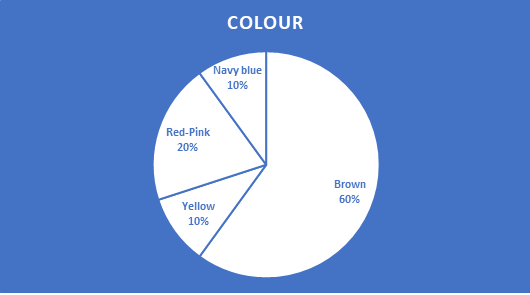
As I have learned about Nigeria, they are divided into farmers and shepherds. Eg Fulani is a tribe that deals with animal husbandry. For this they no longer cultivate the land. So I think that the good idea will be to create website for two group of users – farmers and shepherds. Because of the conflict in the Nigeria, but not only because of this. It will be easier to start searching an information for two groups. It will not be mixed. The pages will be looking very similarly and will work in a similar way but I think that good idea will be to create two other colours for each of groups. To make clear on which part of the webpage the user is. Maybe for the farmer’s part of webpage the good idea will be using various shades of green, but for shepherd’s part the answer was not obvious to me. So I’ve done a survey among my friends and family. This is a result:
So I’m thinking about colour set like this:
What do you think? But don’t worry I will be thinking about colours more after. Now I was thinking to imagine myself how it can looks.
So as I said I think our webpage we will have two kind of users – farmers and shepherds. Nigeria has one of the highest birth rates in West Africa. This means that all every year more and more children born in Nigeria. The dominant way of cultivating the land are small family farms (their production covers about 80% of Nigerians’ demand for food products). Traditional agriculture does not meet the domestic demand for food. To force food production to increase, a lot of basic products (including rice, corn) were banned from importing. Arable lands occupy 33% of the area country, pasture 46%. The majority of agricultural production is provided by traditional farms. Circle about 90% of labor force are farmers. Agriculture generates 39% of GDP.
After this information’s I deduce that our webpage can be using by different age groups. If in Nigeria are a lot of family farms, so I think that everybody are helping – starting at kids/teenagers and finishing at grandparents. Unfortunately, one of the biggest problems in Nigeria is illiteracy. Only 15% of adult women can read and write. In men, these skills are more common – 43% of men have no illiteracy problems.
This information’s gave me an idea – maybe will be really nice if we creating an webpage we will not only put name of categories or names of crops, but next to it some pictures? What do you think? If for example dad with his son will be looking for some information about rice in our webpage the pictures can help to teach this son or if dad has got a problem with eyes because of picture maybe he found this quicker or if some farmer will forgot how this plant is calls because of picture is more likely to find what he is looking for. And I think that when on the webpage is not only test – it is nicer for the eyes.
Summary, I think our webpage will be for two groups of users – farmers and shepherds and for different age groups. I think we don’t need to create login page because I think our webpage should be something like encyclopaedia – open for everyone who wants to increase his own knowledge. Maybe we should create some page for people who will be adding a questions and answer for them. In my opinion, it is worth considering enabling possibility asking questions and answering in the user forum. Not everyone has got emails and is some question will be more than one time good idea will be to put this on the page for all people… I will be thinking about it.
For now this is all about I was thinking. See you soon.
I’m working in a project team as part of the CS22220 module. I am responsible for the User Interface. We started this week – 27/01/2020. I promise Iwill be trying to do the best work as I can. I’m really sorry for a mistakes, but English isn’t my first language. So see You soon again.
This is the first post on my new blog. I’m just getting this new blog going, so stay tuned for more. Subscribe below to get notified when I post new updates.
This is an example post, originally published as part of Blogging University. Enroll in one of our ten programs, and start your blog right.
You’re going to publish a post today. Don’t worry about how your blog looks. Don’t worry if you haven’t given it a name yet, or you’re feeling overwhelmed. Just click the “New Post” button, and tell us why you’re here.
Why do this?
Because it gives new readers context. What are you about? Why should they read your blog?
Because it will help you focus you own ideas about your blog and what you’d like to do with it.
The post can be short or long, a personal intro to your life or a bloggy mission statement, a manifesto for the future or a simple outline of your the types of things you hope to publish.
To help you get started, here are a few questions:
Why are you blogging publicly, rather than keeping a personal journal?
What topics do you think you’ll write about?
Who would you love to connect with via your blog?
If you blog successfully throughout the next year, what would you hope to have accomplished?
You’re not locked into any of this; one of the wonderful things about blogs is how they constantly evolve as we learn, grow, and interact with one another — but it’s good to know where and why you started, and articulating your goals may just give you a few other post ideas.
Can’t think how to get started? Just write the first thing that pops into your head. Anne Lamott, author of a book on writing we love, says that you need to give yourself permission to write a “crappy first draft”. Anne makes a great point — just start writing, and worry about editing it later.
When you’re ready to publish, give your post three to five tags that describe your blog’s focus — writing, photography, fiction, parenting, food, cars, movies, sports, whatever. These tags will help others who care about your topics find you in the Reader. Make sure one of the tags is “zerotohero,” so other new bloggers can find you, too.

 Group Project 21 - User Interface